Save on a year of unlimited fun with this Black Friday sale!
Save big on Annual Passes!
Big thrills, even bigger savings. Annual Passes are now $85 (save $44) for a limited time!
Annual Passes give you 12 months of unlimited rides and free Park entry – a whole year of excitement ready whenever you are. With Summer holidays approaching, now’s the perfect time to secure year-round access whenever the Park is open, including weekends and public holidays (except Christmas Day).
Hurry! Limited-time only. Grab your $85 Annual Pass before it’s too late. Terms and conditions apply.
To redeem this offer, simply purchase one of the $85 Annual Pass Tickets online, and we’ll send you ticket barcodes with your unique member number. Present this unique member number at our ticket box on your first visit and we’ll issue a permanent Annual Pass with your own photo ID.
Annual Pass Cards are valid for 1 year from date of purchase.
All Annual Pass holders can bring one guest into the park for FREE* on every visit (excluding rides). This guest entry cannot be booked online and must be redeemed at the ticket box.
Particularly perfect for Mum, Dad, or grandparents accompanying who may not wish to ride!
*Ride tickets are not included for guests of Annual Pass Holders and must be purchased separately. Guest entry may be subject to availability.
Exclusive Perks
Annual Pass Holders enjoy discounts on select special events, exclusive offers, and early updates on exciting news at the Park delivered straight to their inbox!
Yes, Annual Pass holders are encouraged to pre-book a ticket online to ensure they don’t miss out on the day due to our capacity limits.
#1 To book your ticket online now go to “BUY TICKETS” found in the top right corner anywhere on our website, and then select the “Annual Pass Holders” option.
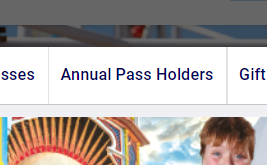
For Desktop users you will find Annual Pass tickets here:
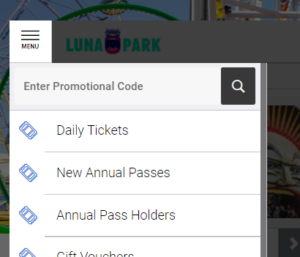
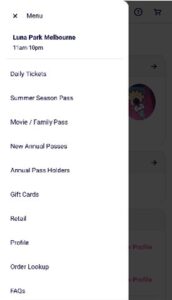
And if you’re on a mobile device first select “MENU” and then “ANNUAL PASS HOLDERS”:
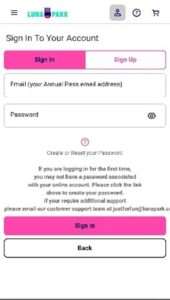
#2 To access your Annual Pass tickets you will first need to log in. If you have never logged in before you will need to select “Create or Reset Password” and use the first and last names of the annual pass holder and the email you used when signing up to receive a reset password email.
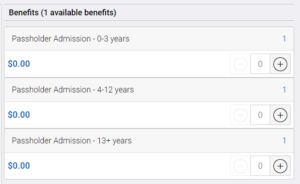
#3 Then select the type of ticket you want to get with your Annual Pass:
#4 Then select the Annual Pass holder Member Benefit:
#5 Next you can search or scroll through days Luna Park is open so you can choose which date you would like to come to the Park. When you find the date you wish to visit, click “BUY TICKETS”:
#6 Finally, just let us know the age of the Annual Pass Holder:
#7 If you are happy with the date and ticket type, click “ADD TO CART”:
Each Annual Pass holder will need to be added to the cart separately.
Unlimited Rides Tickets can be booked online by clicking on the link below. You will receive a confirmation email with a link to your electronic ticket(s) that have a barcode which must be presented at the Ticket Box, either printed or on mobile device.
Tickets will be subject to the day’s availability so to avoid disappointment, please purchase Unlimited Rides Tickets online to guarantee your entry. Please note that our Park Entry Only Tickets can only be purchased at the ticketbox on the day of your visit and are subject to availability.
An online booking fee of AUD$1.55 per ticket will be charged where applicable. This fee is notified prior to purchase throughout the checkout process.
Unfortunately it does not guarantee entry if the park is sold out. If and when more tickets are released for that date you may be able to enter the park. All Annual Pass holders are still required to book date of visit online.
The most common error when logging in is caused by the same email address being used for more than one account.
Please email [email protected] with a screenshot of the error you received along with the first and last names of any other annual passes holders associated with your account.
Yes, even though Annual Pass holders do not need to purchase a ticket to enter, due to capacity limits you must still pre-book a ticket online before you visit the Park to avoid disappointment. Please visit our tickets page to book your ticket which will be subject to availability on the day.
For more detailed information about reserving a ticket using your Luna Park Annual Pass visit the online order instructions located here
To make your Luna Park Annual Pass more secure, and for families much easier to use, when booking tickets you will now need to log into your Annual Pass account using our website.
Your username will be your email address if you provided one when you bought your pass. If you didn’t provide an email address or can’t remember which one you used, we’ll be happy to help you with that and get you online and booking tickets in no time. Simply email your name, the names of any family member who also have Annual Passes and your Annual Pass Member number(s) to [email protected]. One of our team will get back to you with the information you need.
When you have your username you’ll then need to create a password for your account, which again is really easy to do. First you will need to go to the new Annual Pass Holders section of our website. Then to create your new password simply click on the link that says “Create or Reset your Password” and follow the prompts. Enter your name (exactly as you provided it) and your email address and click on “RECOVER PASSWORD”. We’ll send you an email with a temporary password so you can access your Annual Pass account and make you password whatever you want.
Better still, once you’ve set up your password you can go straight to the Annual Pass Holders page and start booking your Unlimited Ride Tickets. Please note that for families only one set of login details are required.
If you have any further questions about accessing your Annual Pass and booking tickets and can’t find the answer you’re looking for in our FAQs, email us at [email protected]
Log into your Annual Pass portal using your email and password.
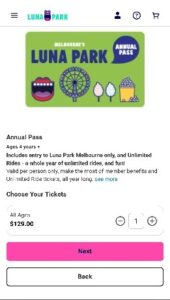
Using the menu on the top left side of the screen, Select “New Annual Pass”.
Select the quantity of your purchase.
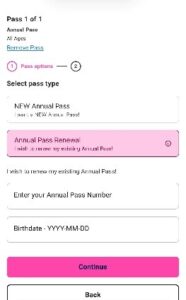
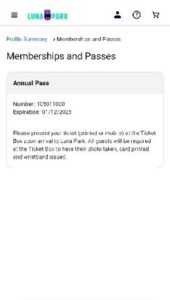
Select “Annual Pass Renewal”. You will need to retrieve your Annual Pass Number (membership number), which is located on your main profile under “Memberships and Passes”. REMINDER: The date of birth must be entered (YYYY-MM-DD).
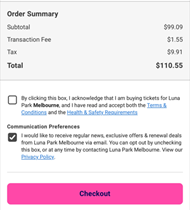
When you are happy with your order, you can continue with your payment.